
Delta Planer Won’t Feed? Complete Troubleshooting Guide (7 Causes & Fixes)
The Quick Answer
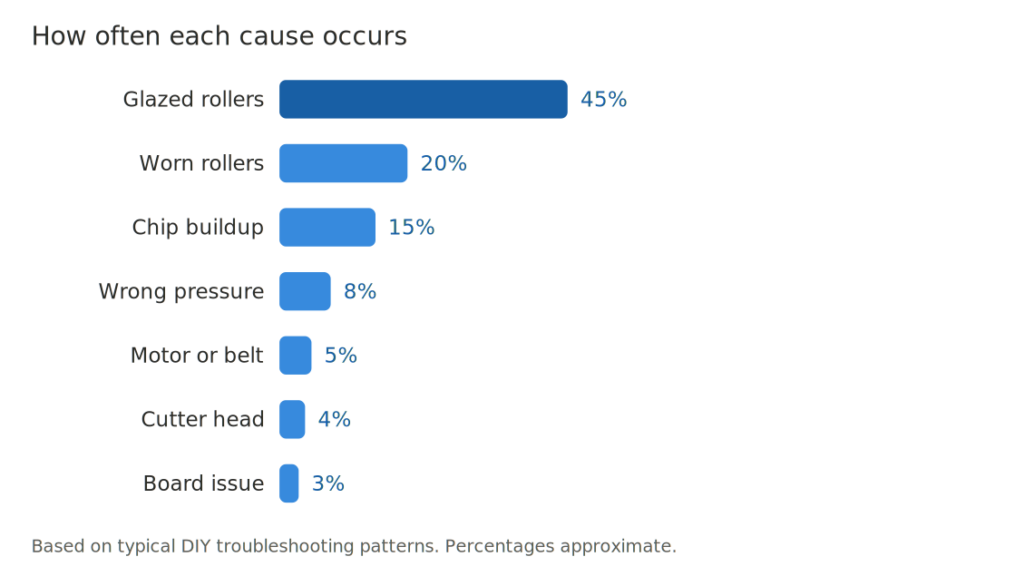
Most Delta planer feed problems come down to one of three things: dirty or glazed feed rollers, worn feed roller surfaces, or chip buildup blocking the feed path. In roughly 70 percent of cases you can fix the problem in under 30 minutes without replacement parts.
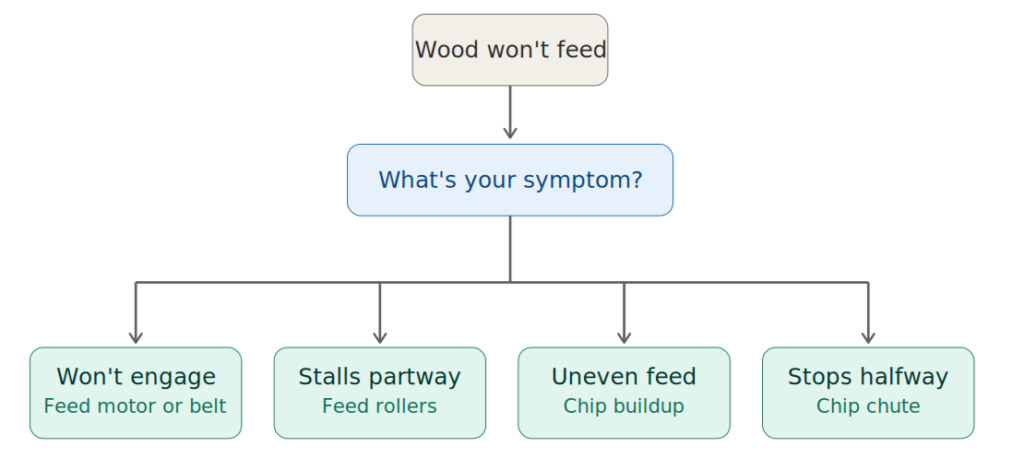
Quick diagnostic table
| Symptom | Most Likely Cause | Where to Look First |
| Wood enters but stalls partway | Feed roller pressure or worn rollers | Check roller wear and pressure setting |
| Wood does not engage at all | Feed motor, drive belt, or gear issue | Check drive components |
| Wood feeds unevenly (skips) | Roller alignment or chip buildup | Clean and check roller alignment |
| Wood feeds only halfway then stops | Cutter head bind or chip ejection blocked | Check chip chute and cutter head |
| Wood grabs then jerks | Glazed rollers or resin buildup | Clean rollers with proper solvent |
| Motor runs but nothing moves | Broken drive belt or stripped gear | Open access panel and inspect drivetrain |
How Delta Planer Feed Systems Work?
Before troubleshooting, understand what is actually moving your wood through the planer.
Every Delta thickness planer uses a two-roller feed system. An infeed roller pulls the wood into the machine, and an outfeed roller pulls it out the back. Both rollers spin at the same speed, driven by a chain or belt connected to the main motor (on portable planers like the Delta 22-540, 22-560, 22-580, and 22-590) or by a separate feed motor (on larger industrial units like the Delta DC-380 and Delta RC-63).
The infeed roller is textured (usually with rubber, urethane, or a serrated metal surface) to grip the wood. The outfeed roller is typically smoother because the wood is already moving predictably by the time it exits. Both rollers press down on the wood with adjustable pressure, controlled by springs or set screws on top of the roller housings.
When feed problems occur, one of these components has failed, worn out, gotten dirty, or been misadjusted. Understanding this makes diagnosis straightforward. When troubleshooting goes beyond a feeding issue, our guide to common Delta planer problems covers other symptoms such as snipe, tearout, chatter, rough finishes, and planer stalling.
The 7 Most Common Causes
1. Dirty or Glazed Feed Rollers (Most Common Cause)
Nearly half of all Delta planer feed problems are caused by dirty or glazed feed rollers. As wood is planed,especially resinous species like pine, cherry, and freshly milled softwoods,heated resin transfers to the rollers, creating a smooth glaze that prevents them from gripping the workpiece.
How to identify
Inspect the infeed roller. A glazed roller will have a shiny, dark surface and feel slick. A clean roller should feel slightly tacky.
How to fix
Unplug the planer, rotate the infeed roller by hand, and clean it with denatured alcohol and a clean rag. For stubborn buildup, use a feed roller cleaner designed for planers and jointers. Avoid mineral spirits, turpentine, and lacquer thinner, as they can damage rubber or urethane rollers.
Prevention
Clean the rollers every 20–30 hours of use or whenever feed performance declines. Store the planer in a dry, dust-free area and keep it covered when not in use.
2. Worn Feed Rollers (Second Most Common)
Feed rollers naturally wear over time. As the rubber or urethane hardens, it can develop flat spots, cracks, or lose its textured surface, reducing grip. Once this happens, cleaning will no longer restore proper feeding.
How to identify
Check for flat spots, cracks, or a hardened, glossy surface that remains slick after cleaning. Rotate the roller by hand to feel for uneven wear, or measure its diameter with calipers if needed.
How to fix
Replace the worn roller. On most portable Delta planers, this takes 20–40 minutes with basic hand tools. Be sure to order the correct replacement, as models like the Delta 22-540 and 22-580 use different feed rollers.
Prevention
If your planer is over five years old and sees regular use, consider replacing the feed rollers proactively to maintain consistent feed performance.
3. Incorrect Feed Roller Pressure
Feed rollers rely on proper spring tension or adjustment to grip the workpiece. Too little pressure causes slipping, while too much can bind the wood or damage its surface.
How to identify
If the rollers are clean and in good condition but feeding problems persist, inspect the pressure adjustment. Most portable Delta planers use spring-loaded roller housings, while larger models may use adjustable set screws.
How to fix
Refer to your model’s manual for the correct settings. As a general guideline, spring-loaded rollers should compress about 1/8 inch when a board is inserted. If your planer has separate infeed and outfeed adjustments, check both, as an incorrect setting on either roller can cause incomplete feeding.
Common mistake
ncreasing roller pressure to compensate for dirty or worn rollers. If repeated adjustments are needed, inspect the rollers instead.
4. Chip Buildup in the Feed Path
Wood chips are the number one uncredited cause of feed failures. Chips build up around the feed rollers, in the chip chute, and under the infeed table. Once enough chips accumulate, they physically block the feed path.
How to identify
Open every access panel on your planer. Look for compacted sawdust and chips. Check the chip ejection port for blockage. If your Delta planer has a dust collection port, disconnect the hose and inspect it for clogs.
How to fix
Vacuum out every chip you can reach. A shop vacuum with a narrow nozzle attachment works better than compressed air, because compressed air can drive chips deeper into machinery. For stubborn buildup around the rollers, use a stiff brush.
Reconnect your dust collection before running the planer again. Delta planers are designed to work with a dust collector attached. Running one without dust collection is the primary cause of chip buildup problems.
Prevention
Empty your dust collection after every project. Vacuum the planer interior monthly if you use it regularly. Never run the planer with a full or clogged dust collector.
5. Feed Motor or Drive Belt Issues
If the main motor runs but the feed rollers do not turn, the problem is likely in the planer’s drivetrain.
Portable Delta planers (22-540, 22-560, 22-580, 22-590): The feed rollers are driven by the main motor through a belt, chain, or gear system. Open the side access panel and inspect for a broken, stretched, or slipped belt, or stripped drive gears.
Larger Delta planers (DC-380, RC-63): These models may use a separate feed motor. If the main motor runs but the feed motor doesn’t, the issue is likely a faulty switch, wiring, or feed motor.
How to fix
Replace any damaged belt or gear. Belt replacement is usually straightforward, while gear repairs may require more disassembly and are often best handled by a qualified technician.
When to call a technician
Seek professional service if the fault isn’t obvious after inspection or the repair requires disassembling the cutter head or feed motor.
If your planer is completely unresponsive before you even try feeding boards, check out our guide on how to fix a Delta planer that won’t turn on to troubleshoot switches, fuses, and power connections.
6. Cutter Head or Bed Adjustment Issues
Sometimes the feed system works fine but the cutter head is set too low, causing the cut to bind against the wood so hard that the feed rollers cannot pull the wood through. This mimics a feed problem but the root cause is depth setting.
How to identify
Try feeding a very light pass (0.005 inches or less). If the wood feeds fine on a light pass but stalls on a normal pass, your cut is too aggressive for the wood or the planer.
How to fix
Reduce the cut depth. Delta portable planers typically handle 3/32 inch max cut per pass on softwood, less on hardwood. If you consistently need heavier cuts, you may be underpowered for the wood or you may need to sharpen or replace the cutter blades.
Bed roller adjustment (on models with them) also affects feed. If the bed rollers are too high, they lift the wood off the bed and reduce feed roller contact. Too low, they add drag. Refer to your manual for the correct bed roller height, usually 0.001 to 0.002 inches above the bed surface.
7. Board Too Small, Too Short, or Too Warped
Some feed problems are not the machine’s fault. Delta planers have minimum board dimensions.
Minimum length
Most Delta portable planers require boards at least 12 inches long for reliable feeding. Shorter boards can be planed but require infeed and outfeed support to maintain contact with both rollers simultaneously.
Minimum thickness
Most models require at least 3/16 inch minimum thickness. Thinner boards flex, tear, or get pulled into the cutter unpredictably.
Warped or cupped boards
If the board rocks on the planer bed, the feed rollers cannot grip it evenly. Joint one face flat first on a jointer before planing. If you do not have a jointer, use a planer sled with shims to stabilize the board.
How to identify
If small or warped boards feed poorly but larger flat boards feed fine, this is your problem.
How to fix
Match your board dimensions to the planer’s specifications. Use infeed and outfeed rollers or tables for shorter boards. Flatten warped boards on a jointer or with a planer sled before planing.
Facing other issues like board snipe, uneven cuts, or strange motor noises? Read our complete breakdown of common Delta planer problems and solutions to keep your machine running smoothly.
Delta Planer Models and Feed System Differences
| Model | Type | Feed System | Notes |
| Delta 22-540 | 12″ portable | Rubber rollers, spring pressure | Most common home shop model |
| Delta 22-560 | 12″ portable | Rubber rollers, spring pressure | Similar to 22-540 |
| Delta 22-580 | 13″ portable | Urethane rollers, spring pressure | Upgraded feed system |
| Delta 22-590 | 13″ portable | Urethane rollers, adjustable pressure | Enhanced adjustability |
| Delta DC-380 | 15″ stationary | Separate feed motor, urethane rollers | Industrial-grade |
| Delta RC-63 | 20″ stationary | Separate feed motor, dual-speed feed | Heavy industrial use |
If you own an older Delta model not listed here, the same general troubleshooting principles apply. Check your model number against Delta’s parts diagrams, which are available online for most legacy models. Delta has produced a wide range of portable and stationary planers, so understanding the differences between models can help you choose the right machine.
See our guide to Delta planer features and models for a closer look.
When to Call a Service Technician?
Most Delta planer feed issues can be fixed with DIY troubleshooting. Consider professional service if:
- You cannot safely access the internal components.
- Replacing worn rollers or belts does not solve the problem.
- The cutter head bearings grind or make unusual noise.
- You notice electrical arcing or a burning smell.
- The planer is still under warranty and DIY repairs could void it.
Typical service costs
Feed roller replacement typically costs $80–$150, while motor or cutter head repairs range from $200–$500, depending on the model and labor rates. For older Delta planers with limited parts availability, replacement may be more cost-effective than repair.
Preventive Maintenance
Regular maintenance prevents most Delta planer feed problems. Clean the feed rollers every 20–30 hours of use using denatured alcohol or a dedicated roller cleaner, and regularly vacuum the planer interior while always using dust collection to avoid chip buildup. Inspect the feed rollers at least once a year and replace them before wear begins to affect performance. Store the planer covered in a dry environment to protect it from dust and moisture. Lubricate chains, adjustment screws, and bearings only as specified in the manual, and never apply lubricant to rubber or urethane feed rollers.
Replacement Parts and Where to Buy Them
For most Delta planer repairs, you will need one or more of these:
Feed roller cleaner: For routine maintenance and glazing removal.
Replacement feed rollers: Model-specific. Order for your exact Delta model number.
Drive belt replacement: For belt-driven feed systems. Check your manual for the correct size.
Complete maintenance kit: Includes cleaner, roller compound, and lubricants. Good if you plan to maintain multiple planers or use yours heavily.
Shop vacuum for chip cleanup: Essential for keeping the feed path clear.
Important: Delta OEM parts are often only available through authorized dealers, not Amazon. For OEM parts, contact Delta Machinery service directly. For third-party equivalents that fit Delta planers, Amazon is fine.
FAQs
1) Why does my Delta planer feed slowly?
Slow feeding is usually caused by glazed feed rollers or feed motor and drive system issues, so clean the rollers first before inspecting the drivetrain.
2) Can I run my Delta planer without dust collection?
While possible for brief use, operating a Delta planer without dust collection is not recommended, as chip buildup quickly leads to feed problems.
3) How often should I replace Delta planer feed rollers?
Feed rollers typically last 8–12 years with hobby use and 3–5 years under heavy use; replace them based on wear, not a fixed schedule.
4) Why does wood feed then stop halfway through?
Feed failures halfway through a cut are usually caused by chip buildup blocking the exit path or an overly aggressive cut that overloads the feed system.
5) Can I fix a Delta planer feed problem without removing the cutter head?
Yes. Most feed problems can be fixed without removing the cutter head, as cleaning, pressure adjustments, chip removal, and feed roller replacement are sufficient in most cases.
6) What is the difference between Delta and Powermatic feed systems?
Both use similar two-roller designs. Powermatic tends to use higher-quality urethane compounds and more precisely machined roller bearings. In practical terms, Powermatic feed systems are more forgiving of neglect. Delta feed systems require slightly more attentive maintenance but perform equally well when maintained.
The Bottom Line
Most Delta planer feed problems are easy to fix, with dirty rollers, worn rollers, and chip buildup accounting for the majority of cases. Start by cleaning the rollers, then check roller pressure, wear, chip buildup, and the drivetrain if needed. Regular cleaning, proper dust collection, and timely feed roller replacement help prevent costly repairs and downtime.